 Click on the [Backup Schedule] tab of the backup setting menu to configure backup schedule of a backup set.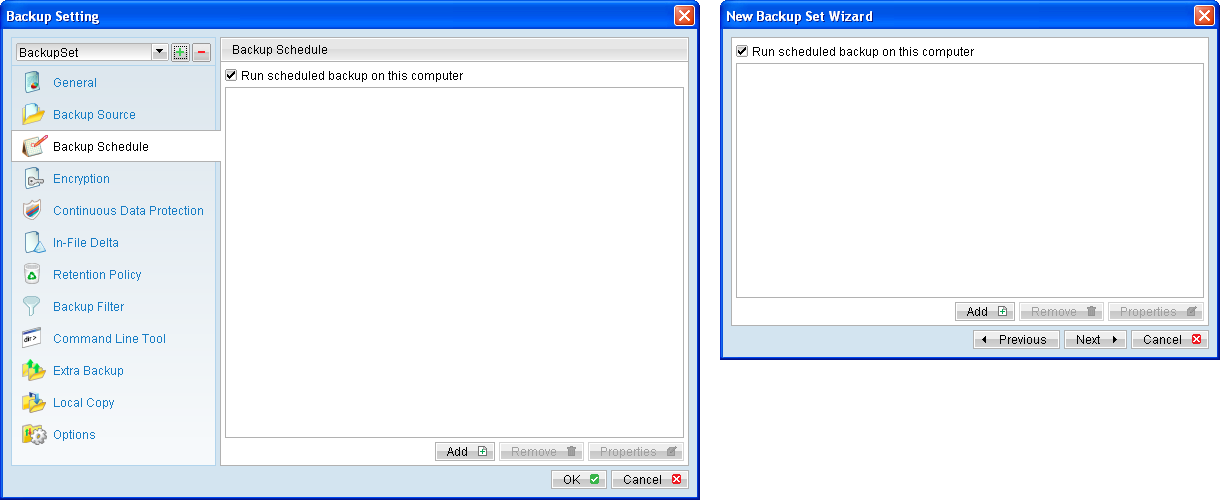
Menu Items |
Description |
Run scheduled backup on this computer |
Checkbox to enable or disable the corresponding backup set to run on this computer. |
Add |
Click to add a new backup schedule. |
Properties |
Click to modify an existing backup schedule. |
Menu Items |
Description |
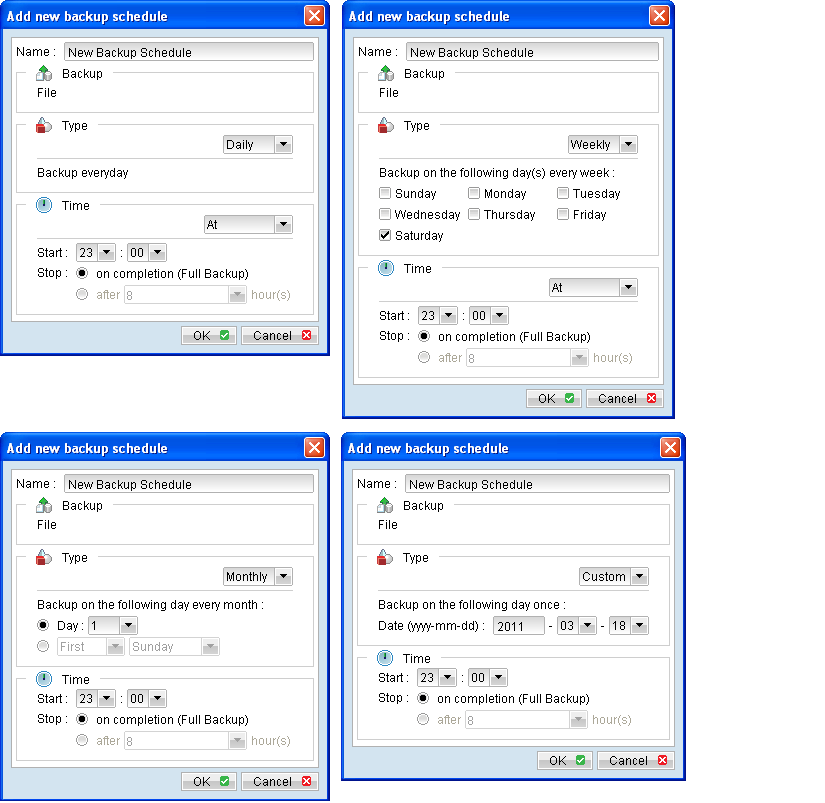
Name |
Input box for entering backup schedule name. |
Type |
Checkbox to select schedule type. Daily - Backup job will run everyday at a specific time under this schedule type Weekly - Backup job will run on specific day(s) of a week, at a specific time under this schedule type. Monthly - Backup job will run on specific day of a month (date, or special criteria such as first weekend, last weekday), at a specific time under this schedule type. Custom - Backup job will run on specific day of a year (date), at a specific time under this schedule type. |
Time (At) |
To start backup job at a specific time. Start - Dropdown menu to select the start time of a backup job. Stop . Option to allow a backup job to run to completion, or to stop the running backup job after a specified hour. |
Time (Periodically) |
To start backup job at regular intervals of time. |
*The availability of features listed above may be service provider dependent. If a feature is not available, please check with your service provider for further details and availability.
- To configure a Daily backup schedule where backup job will run everyday at 8:00pm:
- Select [Add] to open the [Add new backup schedule] dialog.
- Enter name of the backup schedule.
- Select [Daily] from the schedule [Type] dropdown menu.
- Select [At] from the [Time] dropdown menu.
- Configure start time to be 20:00
- Configure the stop option according to your requirement.
- To configure a Weekly backup schedule where backup job will run on Friday every week at 8:00pm:
- Select [Add] to open the [Add new backup schedule] dialog.
- Enter name of the backup schedule.
- Select [Weekly] from the schedule [Type] dropdown menu.
- Select the checkbox beside [Friday].
- Select [At] from the [Time] dropdown menu.
- Configure start time to be 20:00
- Configure the stop option according to your requirement.
- To configure a Monthly backup schedule where backup job will run on first weekend of every month at 8:00pm:
- Select [Add] to open the [Add new backup schedule] dialog.
- Enter name of the backup schedule.
- Select [Monthly] from the schedule [Type] dropdown menu.
- Select [First], [Weekend].
- Select [At] from the [Time] dropdown menu.
- Configure start time to be 20:00
- Configure the stop option according to your requirement.
- To configure a Custom backup schedule where backup job will run on Jan 1st of 2012 (2012-01-01) at 8:00pm:
- Select [Add] to open the [Add new backup schedule] dialog.
- Enter name of the backup schedule.
- Select [Custom] from the schedule [Type] dropdown menu.
- Enter the date when the backup should be performed (YYYY-MM-DD).
- Configure start time to be 20:00
- Configure the stop option according to your requirement.
- Note that multiple backup schedules of different type (e.g. daily, weekly) can also be configured for a single backup set.
- Daily backup schedule at 00:00
- Daily backup schedule at 12:00
- Weekly backup schedule on Friday at 18:00
- Combination of these schedules effectively creates a schedule for backup at 00:00 and 13:00 everyday, and 18:00 every Friday.
For example: