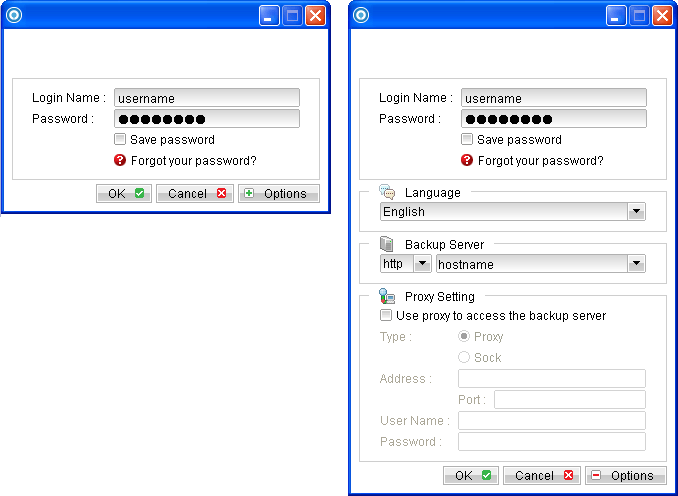
- Login to the backup application's user interface.
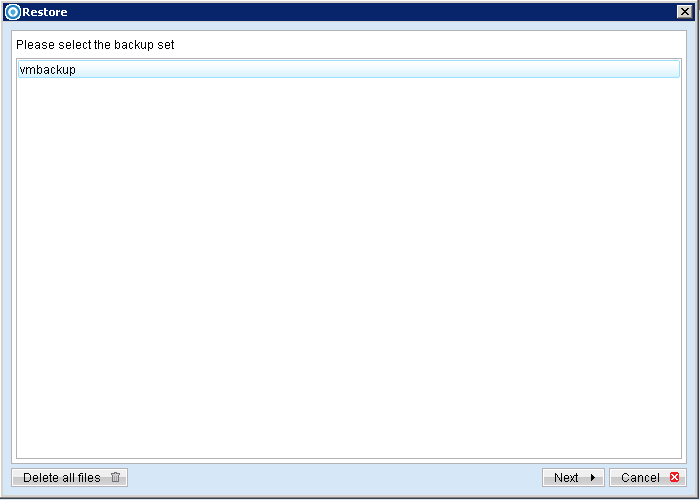
- Select the [Restore] button and the corresponding backup set.
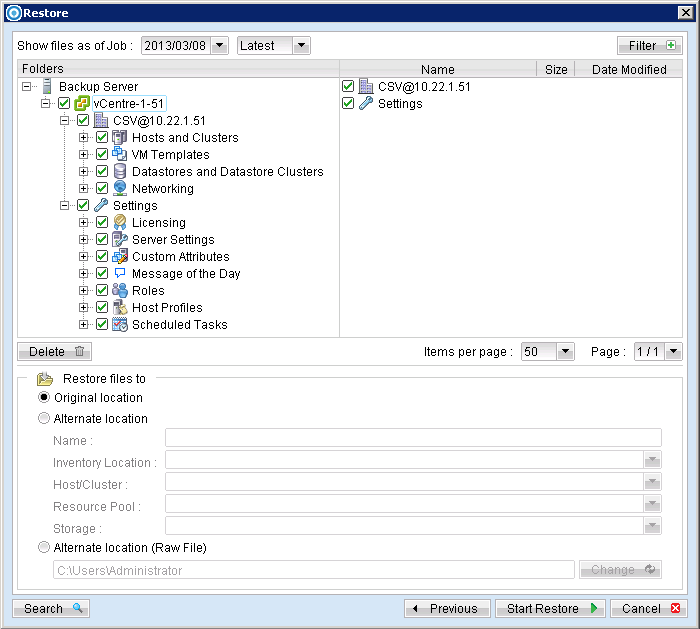
- Select the virtual machines to be restored and choose [Original Location] for restore files to.
- Click the [Start Restore] button to begin the restore process.
- User will be prompted if a virtual machine selected to be restored exist on the hypervisor.
- When the restore process is completed, the virtual machines will be restored to the original hypervisor.
- For any virtual disk that was not restored (e.g. original backup source did not include all hard disks configured for the VM).
Double-click on the OBM desktop icon or right-click on the system tray icon:
vCenter Items |
Description |
Hosts and Clusters |
VM host and cluster, virtual hard disk information. |
VM Templates |
Contains virtual machine templates. |
Datastores and Datastore Clusters |
Contains information about the data stores and data store cluster in the inventory. |
Networking |
Configuration of vSphere distributed switch and network settings. |
Settings - Licensing |
vCenter and host information. |
Settings - Server Settings |
vCenter server settings such as licensing, statistic and timeout information etc. |
Settings - Custom Attributes |
Custom attributes for the VM summary. |
Settings - Message of the Day |
Message of the day in vCenter. |
Settings - Roles |
Information on the login user privilege. |
Settings - Host Profiles |
Configuration details of a specific host. |
Settings - Scheduled Tasks |
Scheduled action for the VM |

Continue to the next steps for instruction to remove the missing hard disk from the virtual machine's configuration.
For original virtual machine with no snapshot
- Open VMware vSphere Client to access the vCenter.
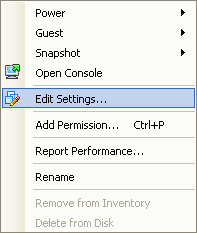
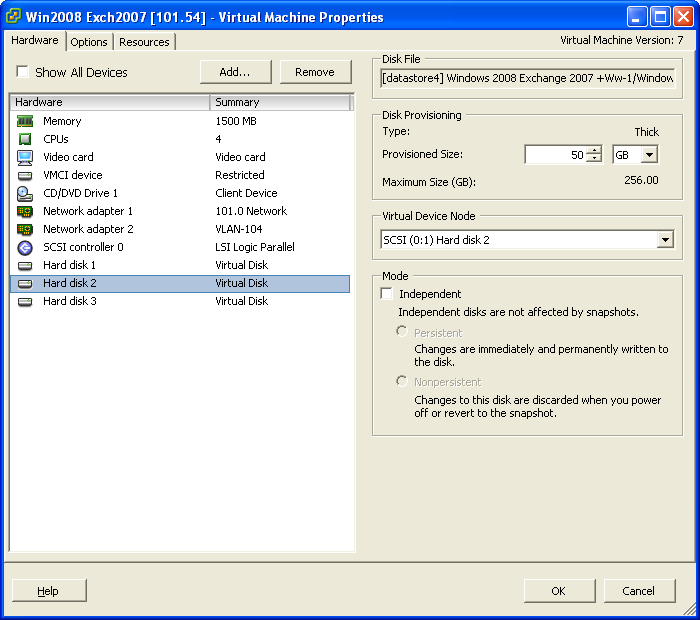
- Under inventory, right click on the newly restored virtual machine, select [Edit Settings].
- For each virtual disk that was not restored, remove the corresponding [Hard disk] from [Hardware].
- Start the virtual machine afterward.
For original virtual machine with snapshot (non-VDDK mode)
- Open VMware vSphere Client to access the vCenter.
- Under inventory, right click on the newly restored virtual machine, select [Edit Settings].
- For each virtual disk that was not restored, remove the corresponding [Hard disk] from [Hardware].
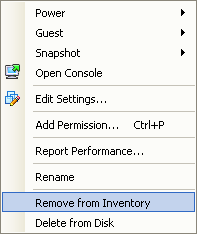
- Remove the VM from inventory.
- Right click on the newly restored virtual machine; select [Remove from Inventory].
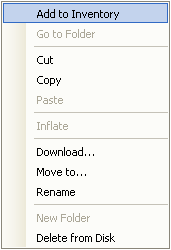
- Locate the virtual machine's folder location on the hypervisor.
- Delete the lines of the removed virtual disk.
- Open the corresponding ${VM-Name}.vmsd file at the following location with a text editor.
Important Serious problem may occur if the configuration files are incorrectly modified; it may prevent the virtual machine from starting. Please only perform the following procedures if you have in-depth knowledge on VMware product.
${VM-Location}\${VM-Name}.vmsd
Example: Snapshot 1, SCSI (0:2) Disk 2 is removed.
.encoding = "UTF-8"
snapshot.lastUID = "1"
snapshot.numSnapshots = "1"
snapshot.current = "1"
snapshot0.uid = "1"
snapshot0.filename = "Windows 2008 Snapshot1.vmsn"
snapshot0.displayName = "Snapshot1"
snapshot0.description = ""
snapshot0.createTimeHigh = "309233"
snapshot0.createTimeLow = "1291281261"
snapshot0.numDisks = "3"
snapshot0.disk0.fileName = "Windows 2008-1.vmdk"
snapshot0.disk0.node = "scsi0:0"
snapshot0.disk1.fileName = "Windows 2008-1.vmdk"
snapshot0.disk1.node = "scsi0:1"
snapshot0.disk2.fileName = "Windows 2008-2.vmdk"
snapshot0.disk2.node = "scsi0:2"
.encoding = "UTF-8"
snapshot.lastUID = "1"
snapshot.numSnapshots = "1"
snapshot.current = "1"
snapshot0.uid = "1"
snapshot0.filename = "Windows 2008 Snapshot1.vmsn"
snapshot0.displayName = "Snapshot1"
snapshot0.description = ""
snapshot0.createTimeHigh = "309233"
snapshot0.createTimeLow = "1291281261"
snapshot0.numDisks = "3"
snapshot0.disk0.fileName = "Windows 2008-1.vmdk"
snapshot0.disk0.node = "scsi0:0"
snapshot0.disk1.fileName = "Windows 2008-1.vmdk"
snapshot0.disk1.node = "scsi0:1"
- Open the corresponding ${VM-Name}.vmsd file at the following location with a text editor.
${VM-Location}\${VM-Name}.vmsd
Example:
Snapshot 1, if one of the disks is removed, updates the value of snapshot0.numDisks.encoding = "UTF-8" snapshot.lastUID = "1" snapshot.numSnapshots = "1" snapshot.current = "1" snapshot0.uid = "1" snapshot0.filename = "Windows 2008 Snapshot1.vmsn" snapshot0.displayName = "Snapshot1" snapshot0.description = "" snapshot0.createTimeHigh = "309233" snapshot0.createTimeLow = "1291281261" snapshot0.numDisks = "3" snapshot0.disk0.fileName = "Windows 2008-1.vmdk" snapshot0.disk0.node = "scsi0:0" snapshot0.disk1.fileName = "Windows 2008-1.vmdk" snapshot0.disk1.node = "scsi0:1"
snapshot0.numDisks = "3"
To
snapshot0.numDisks = "2"
.encoding = "UTF-8"
snapshot.lastUID = "1"
snapshot.numSnapshots = "1"
snapshot.current = "1"
snapshot0.uid = "1"
snapshot0.filename = "Windows 2008 Snapshot1.vmsn"
snapshot0.displayName = "Snapshot1"
snapshot0.description = ""
snapshot0.createTimeHigh = "309233"
snapshot0.createTimeLow = "1291281261"
snapshot0.numDisks = "2"
snapshot0.disk0.fileName = "Windows 2008-1.vmdk"
snapshot0.disk0.node = "scsi0:0"
snapshot0.disk1.fileName = "Windows 2008-1.vmdk"
snapshot0.disk1.node = "scsi0:1"
Important: The restored virtual machine does not support the reversion of previous snapshots if they contain virtual disks not restored.