[Advanced In-file Delta Type] defines an advance policy, where users can override the default In-file delta setting on specific days in terms of day of a week,
or day of a year, for example all Sundays, or the first day of each month.
 This is especially useful for users who want to limit their backup on specific day.
For example, incremental delta backup on weekdays and differential delta backup on Saturday.
Press the [Advanced] button and the [Advanced In-File Delta Type Setting] dialog will be display.
This is especially useful for users who want to limit their backup on specific day.
For example, incremental delta backup on weekdays and differential delta backup on Saturday.
Press the [Advanced] button and the [Advanced In-File Delta Type Setting] dialog will be display.
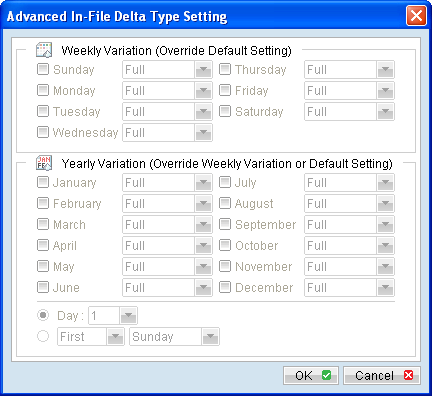
Menu Item |
Description |
Weekly Variation (Sunday to Saturday) |
Click on the checkbox beside the corresponding day to enable advance In-file delta setting for that day. |
Delta type drop down menu (Sunday to Saturday) |
Click on the dropdown menu beside the corresponding day to select the delta type for that day. |
Yearly Variation (January to December) |
Click on the checkbox beside the corresponding day to enable advance In-file delta setting for that day. |
Day number (used with yearly variation) |
Click on the radio button and dropdown menu to select the day number, of month selected. |
Day of week (used with yearly variation) |
Click on the radio button and dropdown menus to select the day of week, of the month selected. |