 Click on the [Retention Policy] tab to modify the retention policy of an existing backup set.
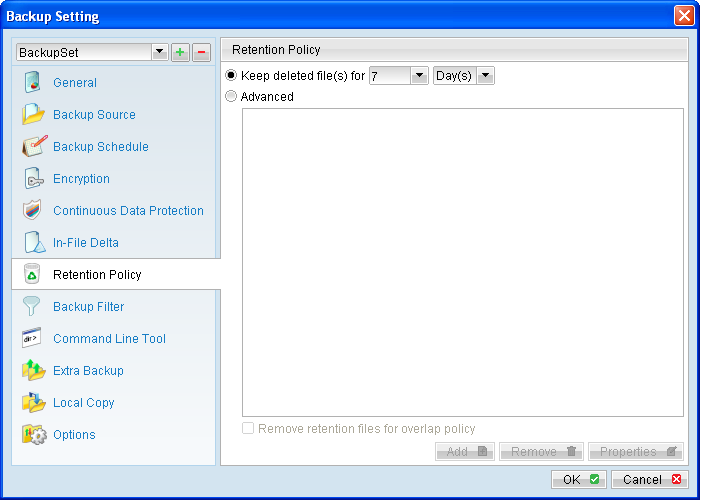
Retention policy defines the policies of persistent data management for meeting business data archival requirements.
When a backup job is performed, for data that are modified or deleted on the client computer, their existing version on the backup server (backed up previously) would be moved into retention area, while newly backed up file would be placed in the current data area.
Specifically, retention policy setting defines how long are these data kept within the retention area before they are deleted permanently from the backup server.
For backed up data that have not been updated or deleted from the client computer, they are kept in the data area on the backup server and remain untouched.
A standard retention policy defines a basic policy where retained file (in the retention area) are removed automatically after a user specific number of days or backup jobs.
To define a standard retention policy, simply modify the [Keep delete file(s) for] drop down menu to your required days or jobs. Press [OK] and save before exiting the backup application to confirm the changes.
An advanced retention policy defines a more advanced and flexible policy where retained file (in the retention area) are removed automatically after a combination of user defined policy, such as:
- A specific number of days
- A specific number of weeks, including the day of the week
- A specific number of months, including the day of the month
- A specific number of years, including the day of the year
To define an advanced retention policy, select the [Advanced] button, and press the:
- [Add] button to add new policy
- [Remove] button to remove existing policy
- [Properties] to edit existing policy
Press [OK] and save before exiting the backup application to confirm the changes.
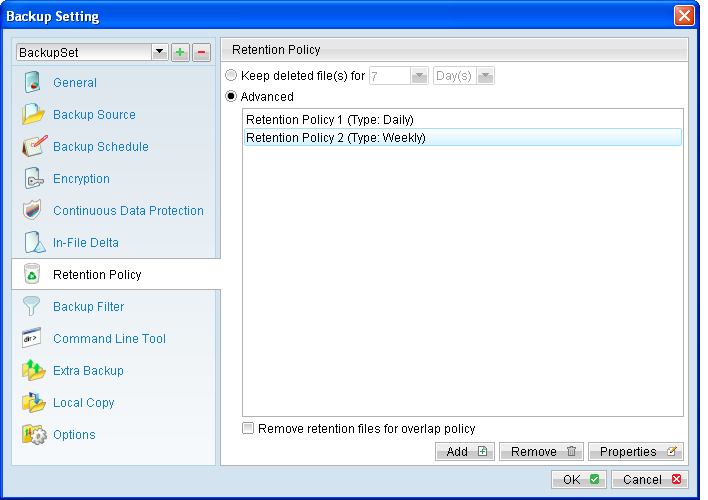 For example, you can configure the advanced retention policy to keep all data backed up:
- In the last 7 days.
- In the last 4 Saturdays.
- In the 1st day of each month in the last 3 months.
- In the 1st day of each quarter in the last 12 months.
- In the 1st day of each year in the last 7 years.
To achieve the above example policy, configured the advanced retention policy as follows:
- Type: Daily
- Number of snapshots to keep: 7
- Type: Weekly
- Keep retention files for the following days: Friday
- Number of snapshots to keep: 4
- Type: Monthly
- Keep retention files for the following days: Day 1
- Number of snapshots to keep: 3
- Type: Yearly
- Keep retention files for the following days: 01-01
- Number of snapshots to keep: 7
Assuming that a file is updated and being backed up everyday for the past 7 years, and today is January 17, 2011. If the option [Remove retention files for overlap policy] is not enabled, a total of 22 snapshots (previous version) of the file would be available for restore:
Daily |
Weekly |
Monthly |
Quarterly |
Yearly |
16-Jan-2011 |
14-Jan-2011 |
01-Jan-2011 |
01-Jan-2011 |
01-Jan-2011 |
15-Jan-2011 |
07-Jan-2011 |
01-Dec-2010 |
01-Oct-2010 |
01-Jan-2010 |
14-Jan-2011 |
31-Dec-2010 |
01-Nov-2010 |
01-Jul-2010 |
01-Jan-2009 |
13-Jan-2011 |
24-Dec-2010 |
01-Apr-2010 |
01-Jan-2008 |
|
12-Jan-2011 |
01-Jan-2007 |
|||
11-Jan-2011 |
01-Jan-2006 |
|||
10-Jan-2011 |
01-Jan-2005 |
If the option [Remove retention files for overlap policy] is enabled, the overlapping snapshots would be removed, with the following snapshots available:
Daily |
Weekly |
Monthly |
Quarterly |
Yearly |
16-Jan-2011 |
14-Jan-2011 |
|
|
01-Jan-2011 |
15-Jan-2011 |
07-Jan-2011 |
|
|
01-Jan-2010 |
|
|
|
|
01-Jan-2009 |
|
|
|
01-Jan-2008 |
|
|
01-Jan-2007 |
|||
|
01-Jan-2006 |
|||
|
01-Jan-2005 |
The weekly policy overrides the daily policy so the snapshots of 10-Jan-2011, 11-Jan-2011, 12-Jan-2011, 13-Jan-2011 and 14-Jan-2011 are removed. The monthly policy overrides the weekly policy so the snapshots of 24-Dec-2010 and 31-Dec-2010 are removed. The same applies to the monthly, quarterly and yearly policy giving a total of 11 snapshots.
Important:
The Retention Policy and Delta Merge feature is closely related, as the criteria for file merging is governed by the retention policy setting configured for a backup set.
Please refer to the Delta Merge section in this guide for further details.