 Click on the [Command Line Tool] tab to configure a Pre-Backup or Post-Backup command.
Command to execute batch file to stop and start an application before and after a backup job, or other command to shutdown the computer when a backup job is complete can be configured.
Click on the [Command Line Tool] tab to configure a Pre-Backup or Post-Backup command.
Command to execute batch file to stop and start an application before and after a backup job, or other command to shutdown the computer when a backup job is complete can be configured.
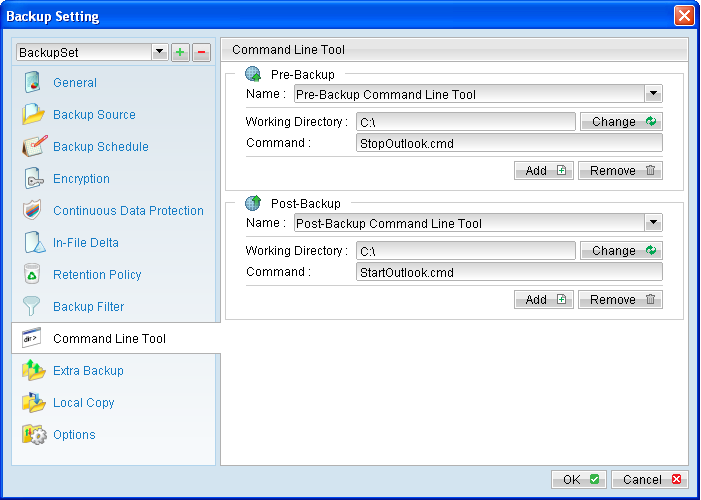
Menu Item |
Description |
Add |
Click to add new pre or post backup command. |
Remove |
Click to remove existing pre or post backup command. |
Name |
Input box to enter name of a pre or post backup command. |
Working Directory |
Directory which the pre or post backup command will run at. |
Command |
Input box to enter pre or post backup command to be run. For Windows: Native command or command to execute a batch, command or VBScript file can be configured: shutdown -s -t 60 batch.bat command.cmd script.vbs For Linux: Command to execute a script file must be configured: /usr/local/command.sh Note: Please ensure that control is returned to the backup application once the command is executed. |
*The availability of features listed above may be service provider dependent. If a feature is not available, please check with your service provider for further details and availability. For OBM installation on Linux platform (without GUI environment installed), you can setup the pre and post backup command on the web console:

Menu Item |
Description |
Add |
Click to add new pre or post backup command. |
Remove |
Click to remove existing pre or post backup command. |
Name |
Input box to enter name of a pre or post backup command. |
Working Directory |
Location the script would be working from. This field can be left empty, but please note that any output from the script would be stored under the OBM installation folder. |
Command |
Input box to enter pre or post backup command to be run. Pre and post command must be put into a script file. It is also recommended to add the absolute path location of the script, such as: /pathname/scriptname.sh Note: Please ensure that control is returned to the backup application once the command is executed. |
Update |
Click to save the changes. |
*The availability of features listed above may be service provider dependent. If a feature is not available, please check with your service provider for further details and availability. The pre and post backup command will run at different stages of a backup according to it backup type. The following table outlines when they would be run:
Backup Type |
Pre-Backup command |
Post-Backup command |
File Backup Type |
Run before any file is backed up (uploaded) to the backup server. |
Run when the backup (upload) of all files are completed. |
Non-file backup type |
Run before any database file is spooled to the designated temporary directory. |
Run after spooling backup files to temporary directory (e.g. before the first backup file is uploaded). |